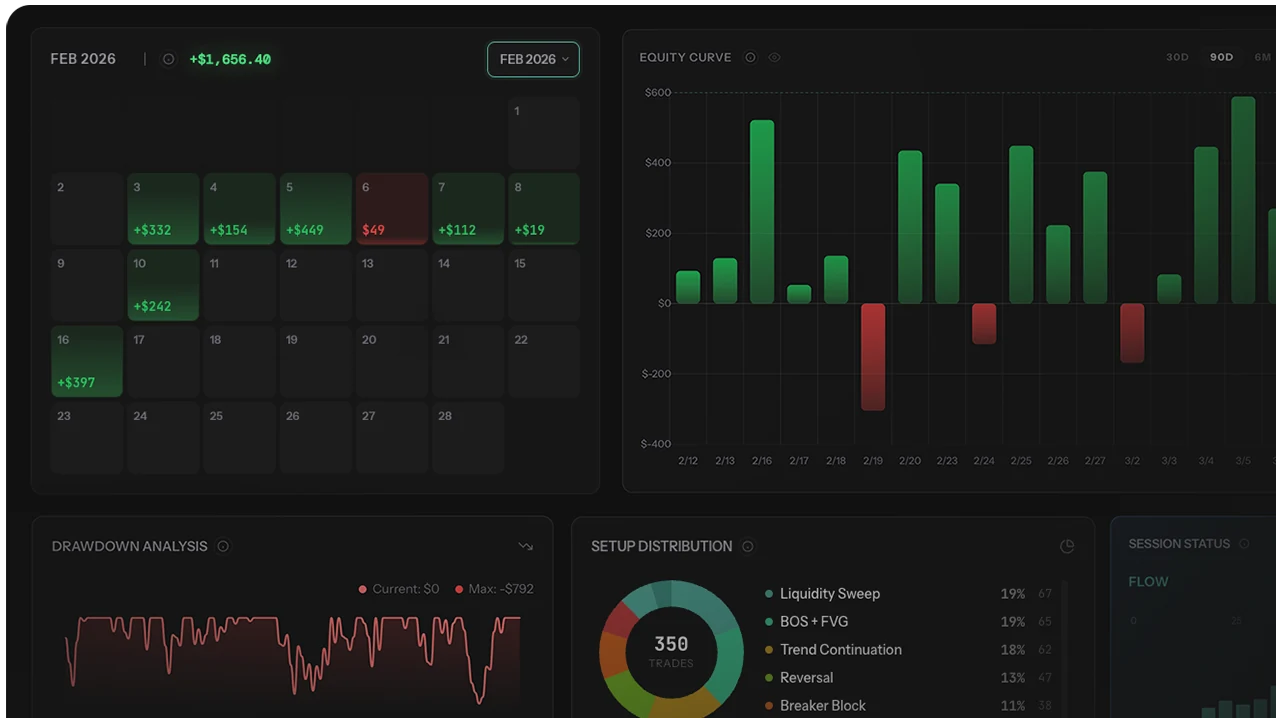
Most traders compare journal apps like they are all solving the same problem. They are not. TSB is strongest if you want a one-time payment and a review workflow built around Notion and prop-firm discipline. TraderSync is strongest if mobile access and deep broker coverage matter most. TradeZella wins on modern replay experience. Tradervue Free is still the easiest zero-budget starting point. The mistake is buying the slickest UI instead of the journal you will still use 6 weeks from now.
| If you want... | The best pick |
| One-time ownership instead of another monthly bill | TSB Pro / Expert |
| Deep broker sync and real mobile access | TraderSync |
| A polished modern interface with replay appeal | TradeZella |
| A free journal you can start using today | Tradervue Free |
| Cheap manual journaling with formula freedom | Edgewonk or a spreadsheet-first setup |
Quick Comparison Table
Before the deep dives, here is every journal compared at a glance. Prices reflect standard pricing as of early 2026.
| Journal | Price | Model | Auto-Import | AI Features | Mobile | Best For |
|---|---|---|---|---|---|---|
| TSB Pro | $179 | One-time | MT4/MT5, Binance, Bybit, OKX, Bitget | AI Insights | Web only | Notion users, crypto/forex, prop traders |
| TSB Expert | $349 | One-time | MT4/MT5, Binance, Bybit, OKX, Bitget | AI Coach + Insights | Web only | Serious traders, prop firm prep |
| Tradervue Free | Free | Freemium | Limited (manual CSV) | None | None | Beginners on a budget |
| Tradervue Gold | $49/mo | Subscription | Broker CSV import | None | None | Stock/options traders who want sharing |
| Edgewonk | $197/yr | Annual sub | Manual CSV | None | Desktop only (Java) | What-if analysis, budget option |
| TradeZella | $29-49/mo | Subscription | Broker sync | Zella AI (new) | Web only | Modern UI fans, trade replay |
| TraderSync | $30-80/mo | Subscription | 300+ brokers | AI analysis | iOS & Android | Deep analytics, stock day traders |
We tested each journal with real trade data over multiple weeks. Pricing, features, and availability reflect what we found as of early 2026. Features and pricing can change — check each product's website for the latest.
What Makes a Good Trading Journal
Not all trading journals are created equal, and most review sites rank them on feature checklists without considering what actually makes traders stick with the tool. The best trading journal is the one you actually use — so these criteria focus on stickiness as much as features. Here are the six criteria that matter most:
1. Analytics depth. The point of a journal is pattern recognition. A journal that only logs trades without analysis is just a fancy spreadsheet. You need win rate by session, instrument, and setup. Drawdown curves. Expectancy tracking. (Not sure what to track in your trading journal? We wrote a full guide.) The more the journal automates this analysis, the more likely you are to actually review your data.
2. Import options. Manual trade entry is the number one reason people abandon their journal. Auto-import from your broker or exchange eliminates that friction entirely. The more brokers and platforms supported, the less chance you will be stuck with manual CSV uploads.
3. UI/UX quality. You will use this tool daily. If the interface feels dated, cluttered, or slow, you will find excuses to skip sessions. Modern design matters — not for aesthetics, but for reducing friction.
4. Pricing model. Subscription journals charge $29-80 per month. Over two years, that is $700-1,900. A one-time purchase at $179-349 saves you money every single month after the first few. The pricing model is a bigger deal than most traders realize.
5. AI features. AI-powered journals can spot patterns in your data that you would never find manually. This is still an emerging category — some implementations are genuinely useful, others are marketing buzzwords. We evaluated each tool's AI on whether it delivers actionable, specific insights versus generic advice.
6. Mobile access. Can you log trades or review your data from your phone? For traders who work at a desk, this matters less. For traders who are mobile, it can be a dealbreaker.
TSB Pro & Expert
Full disclosure: this is our product. We built TSB because we were frustrated with the subscription model of every other journal on the market and wanted something that lived inside Notion, where many traders already organize their life.
TSB Pro gives you 23 embeddable widgets that plug directly into Notion. Your trading journal, analytics dashboards, and performance tracking all live inside your existing Notion workspace. Trade data imports automatically from MT4/MT5 via API sync, and from Binance, Bybit, OKX, and Bitget for crypto traders.
The analytics layer includes 20+ charts out of the box: win rate by hour, day, session, and instrument; equity curves; drawdown tracking; expectancy trends; P&L heatmaps; and emotional state correlations. All of it updates automatically as trades import.
TSB Expert adds the AI Trading Coach, which reads your entire trade history and provides specific, actionable feedback on your patterns. It also includes a strategy backtester (test your edge against historical data) and a prop firm simulator (run your strategy against FTMO/FundedNext rules before paying for a challenge).
The pricing model is the core differentiator: $179 for Pro, $349 for Expert. One-time payment. No monthly fees. No annual renewal. You pay once and keep it forever, including future updates.
- One-time payment saves hundreds vs subscriptions long-term
- Notion integration — journal lives where you already work
- 20-30+ analytics charts, auto-generated
- Exchange auto-sync for crypto (Binance, Bybit, OKX, Bitget)
- MT4/MT5 broker sync for forex traders
- AI Trading Coach gives specific pattern feedback (Expert)
- Strategy backtester and prop firm simulator (Expert)
- 23 embeddable widgets for custom dashboards
- No native mobile app — web-based through Notion
- Newer product compared to Tradervue or TraderSync
- Requires Notion (free plan works, but it is a dependency)
- Broker import limited to MT4/MT5 — no direct TradingView or NinjaTrader sync
- No free tier (free trial available)
Tradervue
Tradervue has been around since 2011, making it one of the oldest dedicated trading journals still in operation. That longevity is both its strength and its limitation. It is stable, reliable, and has a loyal user base — but the product has not evolved meaningfully in years.
The free tier is genuinely useful for beginners: you can log up to 100 trades per month, view basic statistics, and get a feel for structured journaling. The Silver plan ($29/mo) adds advanced reporting and trade filtering. The Gold plan ($49/mo) unlocks the community sharing features, where you can share trades with mentors or trading groups and view aggregated community performance data.
Trade import is primarily CSV-based. You download a statement from your broker, upload it to Tradervue, and it parses the trades. This works, but it is a manual step that adds friction. There is no live API sync with brokers or exchanges. For crypto traders, support is minimal.
The analytics are solid but not deep. You get win/loss statistics, P&L breakdowns by instrument and timeframe, and basic performance charts. There is nothing approaching the AI-driven pattern recognition that newer tools offer.
The UI has not changed substantially in years. It is functional but dated — it looks and feels like a 2015 web application. There is no mobile app.
- Free tier for beginners (100 trades/month)
- Established and reliable — 14+ years in operation
- Good basic analytics and reporting on paid plans
- Community sharing and mentorship features (Gold)
- Supports stocks, options, futures, and forex
- Dated UI — has not been modernized in years
- No mobile app at all
- Manual CSV import only — no live broker/exchange sync
- No AI features of any kind
- $49/mo (Gold) adds up to $588/year for features that newer tools include at lower cost
- Minimal crypto support
- Development pace has slowed significantly
Edgewonk
Edgewonk has carved out a niche with two features that no other journal replicates well: the trade management simulator and the Tilt Meter.
The trade management simulator is genuinely useful. It takes your existing trade data and runs what-if scenarios: what would your results look like if you had moved your stop loss to breakeven after 1R? What if you had trailed your stop instead of using a fixed target? These simulations show you the exact dollar impact of different management approaches applied to your real trades. It is the closest thing to backtesting your trade management without building a full algorithmic system.
The Tilt Meter tracks your emotional state and flags when you are at risk of revenge trading or overtrading based on your historical patterns. It is a simple concept executed decently well.
Beyond those two features, Edgewonk has significant limitations. It is a desktop application built on Java, which means it runs locally on your computer with no cloud sync. If you use multiple devices, your data does not follow you. There is no web version, no mobile app, and no way to access your journal from anywhere other than the machine it is installed on.
The interface is functional but visually dated. Trade import is manual CSV only — no broker API connections. Edgewonk moved to an annual subscription model ($197/year), which makes it cheaper than monthly alternatives but more expensive than one-time options over a multi-year period.
- Trade management simulator is unique and genuinely insightful
- Tilt Meter for emotional state tracking
- Cheaper annually than most monthly subscriptions
- Custom tags and setup categorization
- Works for stocks, forex, futures, and crypto
- Desktop only — no web, no mobile, no cloud sync
- Java-based application (can be slow, OS compatibility issues)
- Dated user interface
- Manual CSV import only — no live sync
- No AI features
- Data stuck on one machine unless you manually back up and transfer
TradeZella
TradeZella is the most visually polished trading journal on the market. The interface is clean, modern, and a genuine pleasure to use. If UI matters to you (and it should, because friction kills journaling habits), TradeZella gets this right.
The standout feature is trade replay: you can replay your executed trades on a chart with candle-by-candle playback, seeing exactly how the trade unfolded in real time. This is an excellent learning tool — reviewing trades this way is far more educational than staring at a static screenshot. No other journal offers this feature at the same level of polish.
Broker import works via direct sync for a growing list of brokers, plus CSV upload as a fallback. The analytics dashboard covers the essential metrics: win rate, P&L by instrument and session, risk management tracking, and performance trends.
TradeZella was founded by Umar Ashraf, a trading influencer with a large following. This has driven rapid growth but also creates a perception challenge: some traders dismiss it as an "influencer product." In our testing, the product itself is solid — though it has had bug reports from users, particularly around import accuracy and analytics calculations during its earlier stages. The team has been actively fixing issues.
Zella AI is the newest addition. It analyzes your trade data and provides insights on your patterns. In its current form, the AI feedback is more general than the specific, actionable analysis from TraderSync or TSB Expert. It is improving, but it is not the primary reason to choose TradeZella today.
The main concern is pricing. At $29-49/month with no free tier and a no-refund policy, the barrier to entry is higher than most competitors. You are committing to a monthly subscription before you know whether the product fits your workflow.
- Best-in-class UI design — genuinely pleasant to use
- Trade replay feature is unique and highly educational
- Direct broker sync for a growing number of brokers
- Active development — product is improving quickly
- Growing community and user base
- $29-49/month adds up fast ($348-588/year)
- No free tier and no refund policy
- Zella AI is still early — not yet a primary selling point
- Some bug reports around import accuracy
- "Influencer product" perception (fair or not)
- No mobile app — web only
TraderSync
TraderSync is the most feature-rich trading journal on the market. If analytics depth is your top priority and budget is not a major constraint, this is the product that has the most to offer in raw capability.
The analytics suite is extensive: win rate by every conceivable dimension (time, instrument, setup, emotional state, day of week, month), drawdown analysis, expectancy tracking, risk management scoring, streak analysis, and detailed trade-by-trade breakdowns. The reporting goes deeper than any competitor.
Broker import supports 300+ brokers — the widest coverage in the industry. For most traders, especially stock day traders using US brokers, the import just works. CSV upload is available as a fallback.
TraderSync has a legitimate mobile app for both iOS and Android. It is not the most polished mobile experience, but it exists and works for reviewing trades and checking performance on the go. This alone sets it apart from every other journal on this list except Kinfo.
The AI features (available on Premium and Elite plans) analyze your trading patterns and provide improvement suggestions. The AI feedback is more specific and actionable than most competitors — it identifies your actual weak patterns rather than giving generic advice. However, the best AI features are locked behind the $50-80/month tiers.
The main issue with TraderSync is pricing. The Pro plan ($30/mo) gives you basic journaling and analytics, but the features most traders actually want — AI analysis, advanced reporting, trade replay — require Premium ($50/mo) or Elite ($80/mo). At $80/month, you are paying $960/year for a trading journal. The analytics justify the price for serious day traders, but it is a significant ongoing cost.
The interface is comprehensive but can feel overwhelming, especially for new users. There are a lot of menus, settings, and options. The learning curve is steeper than TradeZella or TSB.
- Deepest analytics of any trading journal — period
- 300+ broker imports — widest compatibility
- Working mobile app (iOS and Android)
- AI analysis is genuinely useful on Premium/Elite
- Free trial available before committing
- Trade replay feature included on higher tiers
- Mature product with years of development
- Best features locked behind $50-80/month tiers
- $960/year at Elite — expensive long-term
- Interface can feel overwhelming and cluttered
- Steeper learning curve than competitors
- Mobile app functional but not polished
Honorable Mentions
These journals did not make the top five but deserve a mention for traders with specific needs.
Building a trading journal in raw Notion or Google Sheets works for the first two weeks. Then the manual entry kills the habit. If you want a starting point, check out our free trading journal templates. For Notion users, TSB Pro adds the automation layer (auto-import, analytics widgets) that makes Notion viable as a long-term trading journal. Raw Notion without automation is not a sustainable journal for most traders.
Cost Comparison: Subscriptions vs One-Time
The pricing model matters more than the sticker price. Here is what each journal costs over 1, 2, and 3 years — because trading is a long-term activity, and your journal should be too.
| Journal | 1 Year | 2 Years | 3 Years | Model |
|---|---|---|---|---|
| Tradervue Gold | $588 | $1,176 | $1,764 | Monthly sub |
| TradeZella Pro | $588 | $1,176 | $1,764 | Monthly sub |
| TraderSync Premium | $600 | $1,200 | $1,800 | Monthly sub |
| TraderSync Elite | $960 | $1,920 | $2,880 | Monthly sub |
| Edgewonk | $197 | $394 | $591 | Annual sub |
| TSB Pro | $179 | $179 | $179 | One-time |
| TSB Expert | $349 | $349 | $349 | One-time |
The numbers speak for themselves. Over three years, a TraderSync Premium subscription costs $1,800. Tradervue Gold costs $1,764. TSB Pro costs $179 — total, not per year. Even TSB Expert at $349 is less than 6 months of TraderSync Premium.
This does not mean TSB is automatically the best trading journal for everyone. TraderSync has deeper analytics and wider broker support. Tradervue has community features TSB lacks. But on a pure cost basis, the one-time model is dramatically cheaper over any meaningful time horizon.
If you plan to trade for more than 6 months, the pricing model of your journal is a bigger financial decision than most traders realize.
Which Journal Is Right for You?
There is no single best trading journal for everyone. The right choice depends on what you trade, how you trade, and what you are willing to pay. That said, the best trading journal will always be the one that fits your workflow and budget. Here is a decision framework.
Any journal is better than no journal. If you have been paralyzed by choosing the "right" tool, pick one and start logging today. You can always switch later. The cost of not journaling — repeating the same mistakes for months — is far greater than the cost of any tool on this list.
Start Journaling for Free
TSB Pro auto-imports your trades, builds 20+ analytics charts, and costs less than 4 months of any subscription journal — forever.
See Plans & PricingOne-time payment. No subscription. Free trial available.